
When you want to generate a listing of all 'On Hold' Club Members, there are two ways to do so:
Option 1: Generate a Club Export
- Go to Club > Memberships
- To the top-right of the table, click Actions > Export.
- Export your entire list.
- There will be a 'Status' column in the spreadsheet export to identify which memberships are currently on hold.
Option 1: Create a Membership Query
- From the Dashboard, go to Marketing > Queries.
- Click the Add Query button in the upper right.
- Choose Club Membership from the list.
- Title it and click the Add Condition Group button.
- In conditions, choose 'Membership Status' = On Hold.
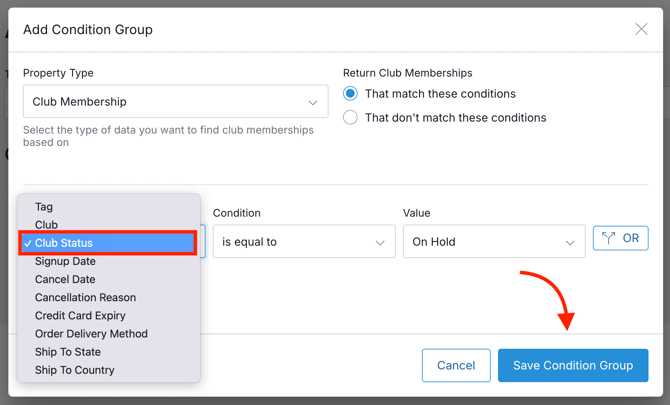
- Click the Save Condition Group button.
- Click the Run Query button.
- Under Actions, you can Export or Tag the results.