For the corporate order upload, it is very important to make sure your format is the same as the corporate order csv sample.
In the csv sample, the date format is written as YYYY-MM-DD. Unfortunately some versions of excel reformat the date field to YYYY/MM/DD, which is not an accepted format in the corporate order upload.
If you are getting an error, you can use another version of excel - or google sheets, to check to see if your birthdate is formatted incorrectly.
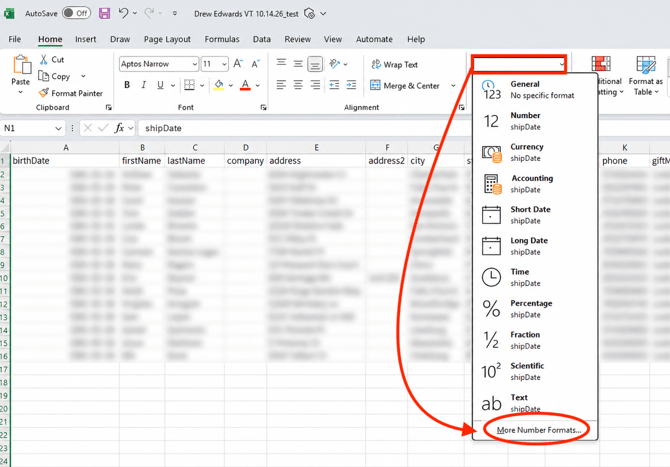
Note: If you are on Windows, or your version of Excel does not have the quick access to the 'Format' link as shown in the video, here's what you'll do:
-
Highlight the date column that you want to format.
-
Choose from the formatting options within the 'Home' ribbon.
-
Select More Number Formats.
- From there, you'll be able to follow the video instructions.