
In this Article
Logging in and Getting Familiar with WinePulse
Log in directly from the Commerce7 Dashboard
If you're already logged in to Commerce7 you'll be able to access WinePulse without the need to log in a second time. With SSO(single sign-on), you'll only need to maintain one set of credentials for both systems.
Please note: Similar to Commerce7's existing reports, only users with Admin Owner or Admin User permissions will be able to access WinePulse.
Still in onboarding? You will not see the WinePulse option until you go live.
Logging in from Commerce7
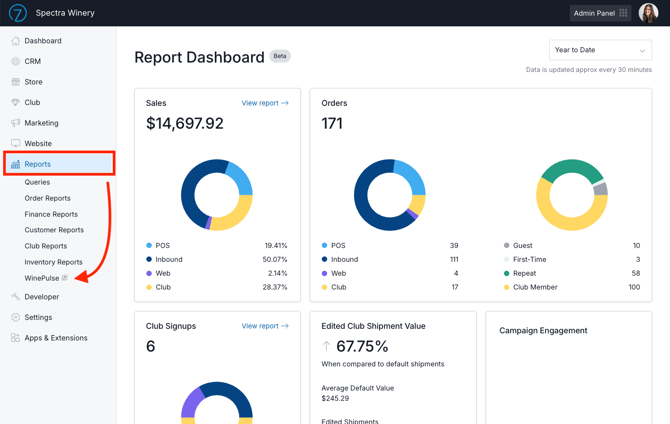
- Go to Reports > WinePulse in your Commerce7 admin.
- This will open WinePulse in a new window and automatically log you in so you can view your reports.
Navigating the Home Page > Reports & Mobile Dashboards
WinePulse syncs data from Commerce7 on a nightly basis. As a result, all WinePulse reports reflect data as of the end of the previous day. (The only exception is the Daily Live Dashboard, which updates in real time).
Once logged in, you'll see content divided into three sections: Folders, KPIs and Mobile Reports.
Section 1: Report Folders
WinePulse reports are grouped within 10 folders:
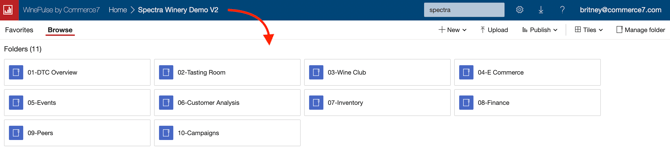
Let's take a look at each folder:
Most WinePulse reports share a similar layout and workflow. You will also see various filters depending on the report.
Detailed reports in WinePulse are in-depth, can be filtered, printed and exported. They can also be emailed automatically daily, weekly or monthly. Learn about email subscriptions here.
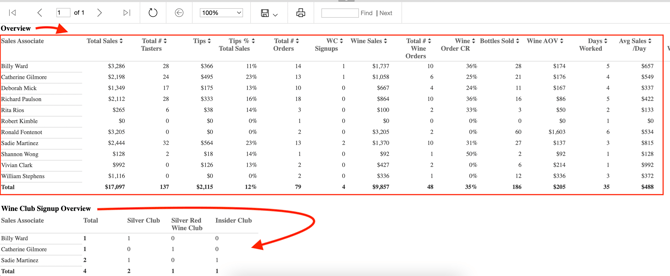
Using the Sales Associate Overview report as an example, let's take a look at how the reports are generally laid out.
- Define a Date Range.
- Define a Sales Associate - 'all' is chosen for this example.
- Depending on the report, you may have additional filters like Order Type (Channel), Product Type or Zip Code range.
- Click the View Report button.

- You will see a Sales Overview and at the bottom, you will see a Wine Club Signup Overview.
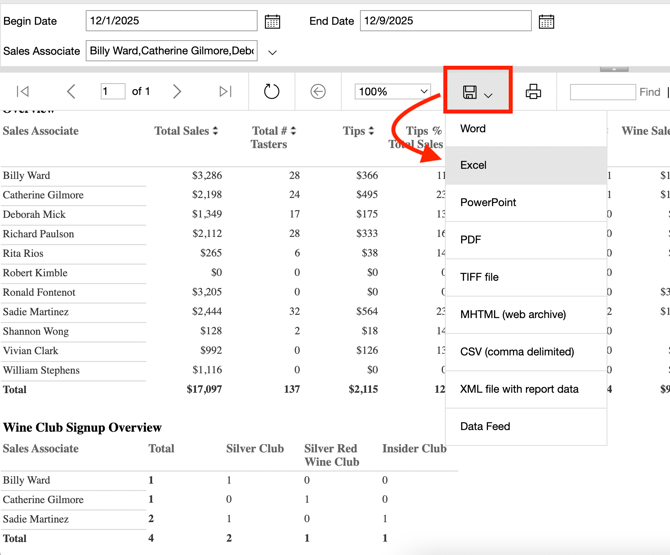
- If you'd like to download, click the download icon and choose your preferred format.
Section 2: Mobile Dashboards
At the bottom of the page, you’ll see the available Mobile Reports. These reports provide easy to read dashboards that can be viewed on a computer screen, phone or tablet.
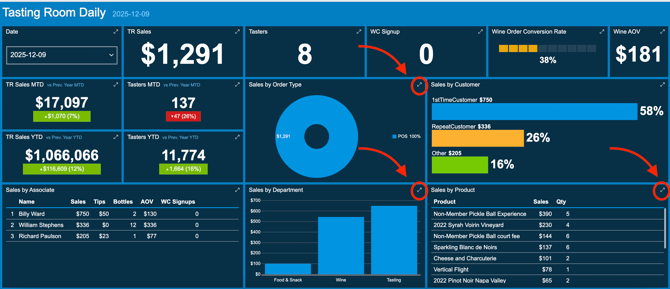
The Dashboards give you visual, at-a-glance views of your business while you're on the go. Here's an overview of what they look like.
 |
 |
Tip: Depending on your screen resolution, some dashboard tables may include additional data that isn’t fully visible on the main view.
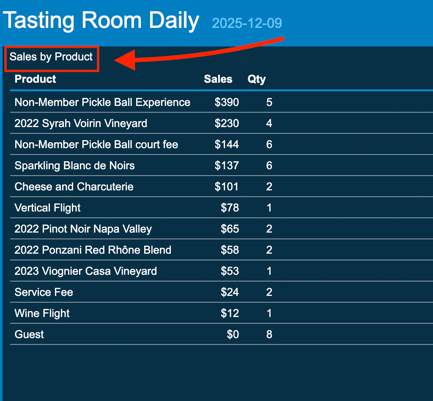
You can isolate and expand a specific section by clicking the expand icon in the upper-right corner.
To return to the Dashboard view, click the section name.
FAQ
- Can I set it up so that specific reports are emailed to me automatically?
Yes - learn how here. - How can I expand the data I see on the Mobile Reports?
Click on the expand icon in the upper right corner of the section you want to see. Learn more here. - How can I print the DTC Dashboards to PDF?
Learn the options here. - Where can I see a complete list of all WinePulse DTC reports and what they are used for?
You can view a full index of WinePulse reports, along with a description of each report’s purpose, here. - Why can't I see my DTC sales for today on any reports?
WinePulse reports focus on DTC analytics and trends, utilizing data imported nightly from Commerce7 to generate dashboards and reports. Therefore, you will not see any data from the current day.
The one exception to that is the Daily Live Dashboard located in the Mobile Reports section. The Daily Live Dashboard presents data in real-time. - How can I count Visitors in WinePulse Reports?
There is no consistent industry standard for what qualifies as a “Visitor”. Some wineries record every taster as a Visitor, others count anyone who walks into the Tasting Room, while others exclude guests who only purchase wine to go. For example, should everyone attending a Wine Club Pickup Party or Winemaker Dinner be counted as a Visitor? What about a club member who simply picks up their wine without stopping to taste?
This inconsistency raises an important question: should you use the number of Visitors or the number of Tasters when calculating conversion rates? A winery that uses total Visitors for Wine Order Conversion or Wine Club Sign-Up Conversion will see lower conversion rates than one that uses Tasters.
Because of these variations in how “Visitor” is defined and recorded, WinePulse does not include Visitor Count in its Dashboards and does not use Visitor Count in its reporting calculations.
If you use the workaround where you record visitors using a product SKU, you can use the following reports:
01- DTC Overview > Sales and KPI > 14- Sales and Quantity by Day and Product Name
01- DTC Overview > Sales and KPI > 15- Sales and Quantity by Day and Product SKU
-
Why do some WinePulse DTC reports automatically run and others don't?
Reports with multiple selection criteria that retrieve large amounts of data do not run automatically. Enter your desired criteria and click 'View Report' to generate results. If you choose 'Select All', please allow a few extra seconds for the report to load. -
Why does my DTC Monthly Goals Forecast look excessively high or low?
At the start of each month, the Goals Monthly forecast may appear unusually high or low, depending on the first few days’ activity. For instance, if the month begins with a busy Saturday, the early data can lead to an overly optimistic projection for the rest of the month. As more days are included, the forecast becomes more balanced and accurate. This effect is especially noticeable if Wine Club processing occurs early in the month, since those initial sales are used to estimate monthly Wine Club and total sales. - I'm unable to log into WinePulse on older iPads.
Older iPads that cannot be updated to a recent iOS version may experience persistent login authentication issues, where the login window repeatedly prompts for credentials. Clearing history and saved passwords does not resolve this problem. This issue does not occur on newer iPads running the latest versions of iOS. -
Customer Analysis Reports - data is not downloading - why?
If you see a white screen instead of the data download progress, this may occur if you clicked the 'Back to Parent Report' button before reselecting the data you want to download.
To rectify this go back to the top report level and restart your report data selection.
Detailed steps to reproduce the problem:
-
- Click on a county from the initial data that shows with the map.
- It starts to load data - Click CANCEL to stop it loading that data (maybe because you selected wrong county etc)
- Click the Back to the Parent Report button
- Select a new county and it goes to the page as if it is loading data but no data icon displaying.
-
-
Why can't I deselect a checkbox for some features when using my Mac?
Some WinePulse reports or email subscription check box selections cannot be selected/deselected by mouse clicking with a Mac. Instead use tab to move to the checkboxes and the space bar to deselect/select. -
Who has access to WinePulse reporting?
Commerce7 users with a permission level of Admin Owner and Admin Users will be able to access WinePulse reports through Single Sign-On. Any users who previously had access to all of Commerce7's reports, will now have access to WinePulse reports.
- How can I access ChatDTC?
ChatDTC has been reimagined and improved in the for of an AI-powered resource (Ask Pip) within Commerce7. Learn all about Ask Pip here.
- I can't access Dashboards on the PowerBi app anymore. Why is that?
Previously, WinePulse users could install the PowerBI app on their phones and view their dashboards by logging in with their WinePulse credentials. With the introduction of Single Sign-On (SSO), this integration is no longer supported and the PowerBI app will not function with the new login method. While we determine a possible solution, you can still access all of your Dashboards by navigating to the WinePulse login page on your phone by simply going to https://myaccount.winepulse.com/Reports and logging in. - I'm an existing WinePulse customer. What happened to my custom reports?
By default, your custom reports will not be visible and will need to be rebuilt by the Commerce7 team. To reinstate them and review the associated monthly fees, please contact Commerce7 Support.
- I'm still in onboarding, why don't I see the WinePulse option in Admin?
You will not see the WinePulse option until you go live. - How are 'Tasters' calculated in Tasting Room Reports and Dashboards?
Learn about how 'Tasters' are counted here. - How is Wine AOV value calculated in WinePulse?
The reports calculate Average Order Value by taking the total wine sales amount for the selected date range and dividing it by the total number of wine orders during that same period.
In simple terms:
Wine AOV = Total Wine Revenue ÷ Total Wine Orders
The calculation is filtered by both the selected reporting date range and the order type before the Average Order Value is determined.
There is also logic in place to prevent divide-by-zero errors. If there are no qualifying wine orders during the selected timeframe, the report will return a value of 0 rather than generating an error.
From a reporting perspective, this means the Wine AOV reflects the average revenue generated per wine order within the selected date range and order type criteria. - Does AOV (Average Order Value) include pours, damaged bottles, etc?
Currently it does. But our development team is actively working on a solution.