
Whether it's daily sales or trend analysis, these reports will give you the answers you're looking for.
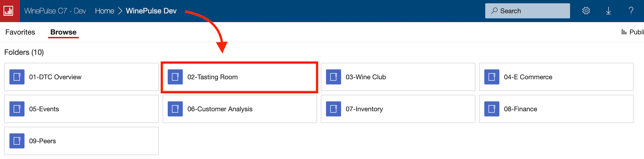
- Choose 02- Tasting Room
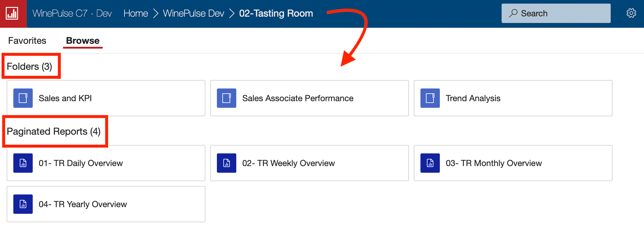
- Choose the applicable report based on what you're looking for.
Common queries and how to find the answers
- Does AOV (Average Order Value) include pours, damaged bottles, etc?
Currently it does. But our development team is actively working on a solution. - Can I find an overview of tasting room sales associate performance by date range?
Learn how here. - How are the values for Tasters calculated?
Learn all about the Tasters feature here. - How can I count Visitors in WinePulse Reports?
There is no clear industry standard defining what constitutes a 'Visitor'. Some wineries record a Taster as a Visitor, others will count a Visitor as anyone entering their Tasting Room, others still will exclude those buying wine to go. For example, are all the people who attend a Wine Club Pickup Party or Winemaker Dinner counted and recorded as a visitor? What about a club member picking up their wine, but not stopping to taste?
Should the number of Visitors, or number of Tasters, be used to calculate conversion rates? A winery who uses the Visitor count for Wine Order Conversion or Wine Club Sign-up Conversion reporting will produce lower conversion rates than one using Tasters.
Because of all these inconsistencies, WinePulse does not report on Visitor Count in its Dashboard or use Visitor count in its calculations for reporting purposes.
If you use the workaround where you record visitors using a product SKU, you can use the following reports:
01- DTC Overview > Sales and KPI > Sales and Quantity by Day and Product Name
01- DTC Overview > Sales and KPI > Sales and Quantity by Day and Product SKU
- What do the 'Remix' values represent in the Package Revenue Analysis Report?
- Base Revenue: Revenue from the club release if no active members had edited their individual club package
- Remix revenue: Additional revenue generated by members that edited their default club package
- Net revenue: Base Revenue + Remix Revenue
- Remix Subscribers: Number of members who edited the default club package
-
Remix per Package: Remix revenue / total number of club packages for this release. It is the additional revenue per package coming from the edit of the default club package
-
Remix % over Base: (Remix Revenue / Base Revenue) * 100
- Can reports be filtered to show individual tasting room locations separately rather than aggregated together?
Yes. Go to 02-Tasting Room > 01-Sales & KPI > 09-Sales & Qty by Product Name.