
VinoCheck is a dedicated wine compliance platform designed to make managing regulations simple and reliable.
It delivers real-time destination-based tax accuracy, instant order validation against state and local rules, proactive license, permit, and filing deadline reminders, and automated reporting tools, so your team can stay compliant, reduce manual work, and protect every shipment as your DTC program grows.
In this Article
What is VinoCheck?
VinoCheck is wine compliance made easy. Get real time tax accuracy, order validation, filing reminders and more.
License, Permit, & Filing Deadline Reminders: Centralize every state license renewal, permit renewal, and filing deadline in one place. VinoCheck tracks what you hold, what you’re missing, and what’s coming due, so nothing slips through the cracks as your shipping footprint expands.
Instantly Validate Orders for Compliance: Catch issues before a shipment goes out the door. VinoCheck checks each order against destination rules and flags non-compliant orders immediately, reducing returns.
Real-time Destination Based Tax Calculation: Apply the correct tax rate based on where you're shipping an order. VinoCheck calculates destination-based taxes in real time even handling tricky scenarios such as unincorporated areas so you can charge accurately at checkout.
Manage Heritage District, Bottle Bill, and Other Fees: Many jurisdictions impose deposits, district assessments, and special fees that are easy to miss. VinoCheck identifies applicable fees by destination and helps you present and collect them cleanly
Streamline Your Filing Process with Convenient Reports: Turn messy order history into filing-ready numbers. VinoCheck generates clear, sortable reports by state and period so your team (or compliance partner) can prepare and file returns faster with fewer manual pivots and fewer errors. Wineries on VinoCheck can generate 80 different completed state filings with one click!
How it Works
Once you connect VinoCheck to Commerce7, you'll then choose and enable the states you ship to and configure state settings.
eCommerce Checkout Workflow: The eCommerce checkout workflow supports real-time tax calculation during checkout and final compliance validation at order submission. Learn more about the eCommerce Workflow here.
Club and Subscription Workflow: The Club and Subscription workflow supports batch-generated orders that are reviewed before being finalized and released. Learn more about the Club & Subscription Workflow here.
POS Workflow: The POS workflow supports tasting-room transactions where the purchaser is present and staff can resolve issues in real time. Learn more about the POS Workflow here.
Connecting VinoCheck to Commerce7
- Create a VinoCheck account.
- Onboarding to VinoCheck is very easy. Once the integration is activated, VinoCheck automatically syncs your SKUs and migrates your existing data.
- The winery typically only needs to commit about one hour to the initial setup, and the VinoCheck team manages the remaining steps - with a turnaround time of one day.
- Book a demo and sign up here.
-
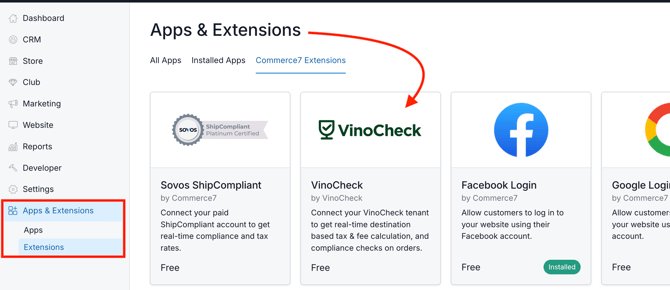
Once you've created a VinoCheck account, in Commerce7, go to Apps & Extensions > Extensions.
-
Click into the VinoCheck card.
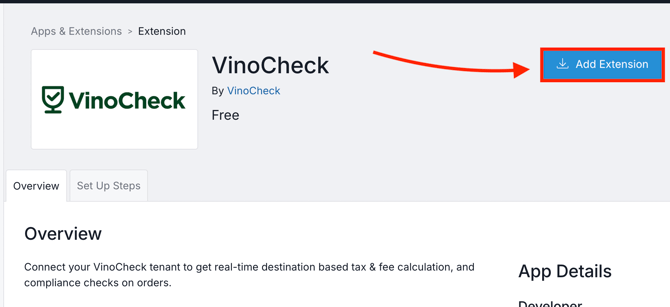
- Click the Add Extension button.
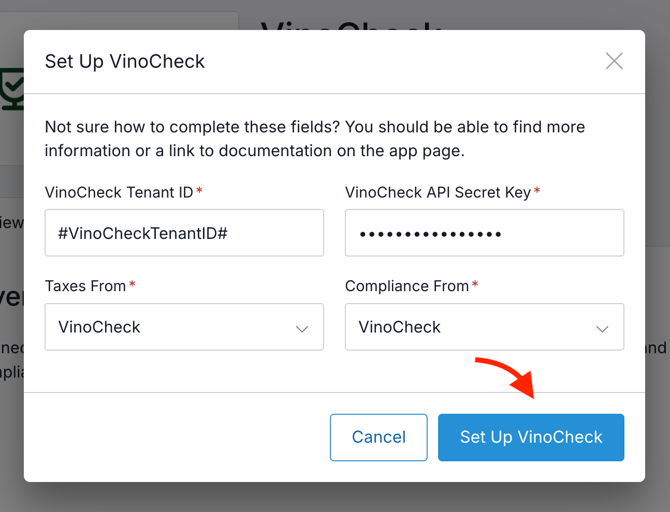
- In the popup modal, enter in the VinoCheck Tenant ID, and API Secret Key (both of these can be accessed in your VinoCheck account). If you have trouble locating this info, contact info@vinocheck.com for help.
- Taxes From: Choose VinoCheck.
- Compliance From: Choose VinoCheck.
- Click the Set Up VinoCheck button.
If you need any assistance with setup or have questions about VinoCheck, feel free to reach out to info@vinocheck.com. They'll be happy to help!
To access further VinoCheck documentation and developer docs, visit here.