
Lane 3600/3600 P2PE by Ingenico

NOTE: The Lane 3600/3600 P2PE connects via Ethernet and does not connect directly into laptop computers.
Lane 3600/3600 P2PE FAQ's
- Which region is eligible for the Lane 3600?
US & Canada - Which region is eligible for the Lane 3600 P2PE?
US only - What is the Lane 3600 P2PE?
P2PE stands for Point-to-Point Encryption. It encrypts card data at the payment terminal and keeps it encrypted as it passes through the approved payment solution, helping limit your systems’ exposure to sensitive cardholder data. Some regions require P2PE for transactions. If this applies to your region, select the Lane 3600 P2PE when ordering. - Which Payment Processor is able to use the Lane 3600/3600 P2PE?
Fullsteam Payments - Can you add tips directly on the Lane 3600/3600 P2PE?
Optional - Which operating systems support the Lane 3600/3600 P2PE?
- iOS
- Android
- Windows
- Is there a screen / keypad directly on the device?
Yes - Is there an integrated thermal printer?
No - Can the Lane 3600/3600 P2PE take mobile payments?
Yes - What is the Lease payment for the Lane 3600?
US: $20.99 per month
CA: $31.99 CAD per month - What is the Lease payment for the Lane 3600 P2PE?
US: $25.99 per month - What is the purchase price for the 3600?
US: $599 each + $3.99/mo software fee
CA: $959 CAD - What is the purchase price for the 3600 P2PE?
US: $699 each + $3.99/mo software fee - Does the Lane 3600/3600 P2PE accept ApplePay and GooglePay?
Yes - Does the Lane 3600/3600 P2PE have Tap, Swipe and Insert functionality?
Yes - How does the Lane 3600/3600 P2PE connect?
Hard Wired (ethernet) - What's a good use-case for choosing the Lane 3600/3600 P2PE?
You have a set register with ethernet connectivity nearby. - How do you set up the Lane 3600/3600 P2PE device once you receive it?
Click here to view the Setup article/video. - What is the workflow like?
Click here to learn how it works. - Ready to Order?
All devices must be purchased through Commerce7.
Step 1: IMPORTANT! Review the Return and Exchanges terms here.
Step 2: In Commerce7, navigate to the Help Center and click on Order EMV Terminals.
- Who will see this section?
-
Only users with Admin Owner permissions.
- Only tenants who are active Fullsteam customers (once a Fullsteam MID has been activated).
-
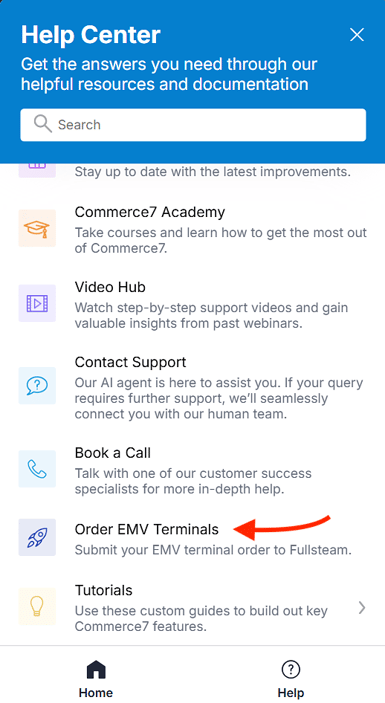
Once submitted, Fullsteam will order the terminal(s) for you.
- Who will see this section?