
What it is
Guest Intelligence is a feature that lets participating wineries tap into aggregated, anonymized customer data from across the Commerce7 network. When a customer provides their email, Commerce7 cross-references it across the network to surface key behavioral insights. Learn more about how Commerce7 uses AI here.
Why we built it
Guest Intelligence gives tasting room staff the context they need to have smarter conversations, make more relevant recommendations, and deliver the kind of personalized hospitality that turns first-time visitors into loyal club members.
- Feature can be enabled in Settings > General > Guest Intelligence.
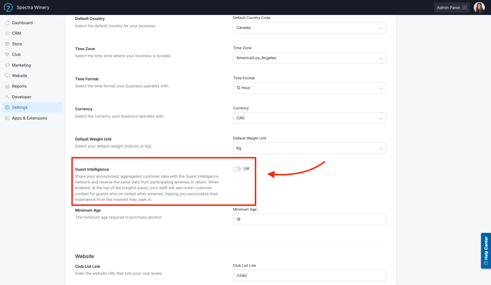
- When the tenant opts-in, they agree to share their data in order to receive data from the Commerce7 network of opted-in wineries.
- All data is anonymized and aggregated. No specific club names, reservation data, or spend information is shared. The data points shared can be viewed below
Staff can personalize the experience from the very first interaction, not after multiple visits, which means stronger hospitality and more opportunities to convert.
How it Works
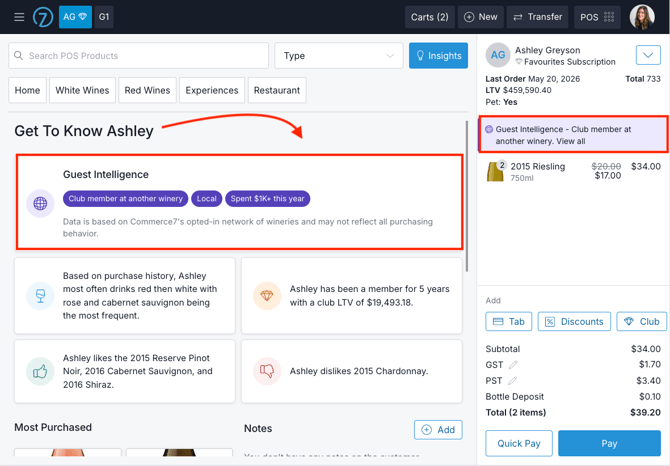
- Users will see a Guest Intelligence card at the top of the Insights panel across Admin, POS, & Reservations
- When a customer’s email matches data from opted-in wineries across the Commerce7 network, the user will see a set of aggregated data points that provide additional insight into that customer.
- On the POS, an alert will also display in the Cart, letting them know to check the Insights panel.
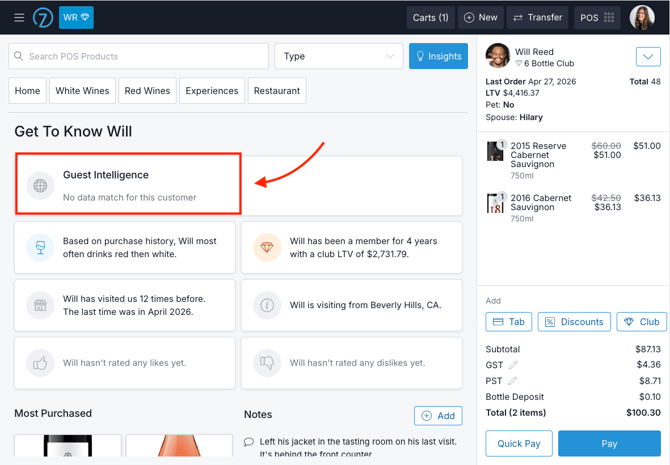
- If there is not a data match, the user will see be a message letting them know.
- On the POS, an alert will also display in the Cart, letting them know to check the Insights panel.
What Data comes in?
Data Parameters |
What Displays |
|
|
|
|
|
|
|
|
|
|
Key Information
- Guest Intelligence is an opt-in service.
- Only participating wineries share and receive data.
- The specific data points shared are clearly disclosed in the opt-in process.
- The opt-in language has been updated to ensure full transparency around the data being shared.
- Commerce7 cannot provide customer-specific legal or compliance advice.
- Each winery is responsible for determining whether participation aligns with its legal obligations, privacy policy, and applicable regulations.
FAQ
- What information is required so that Guest Intelligence data will display for a customer?
Email address is required to find data for the customer. We recommend starting the order with a customer's email address wherever possible. - Does Guest Intelligence include data from my own winery?
No. Data displayed only includes data from other wineries. It does not include the winery's own data. -
Do the guests have the opportunity to opt out of this tracking?
Guests cannot opt out of guest intelligence tracking; the winery chooses whether to opt in, and the data shared is completely generic and aggregated. -
Does Guest Intelligence track visits from other reservation systems, such as Tock, or only from Commerce7 reservations?
Guest Intelligence tracks visits on both C7 and Tock reservation systems if Tock is integrated with C7. -
Can you clarify whether our customer's information is shared when we opt-in to Guest Intelligence?
Customer information is shared only in aggregated form - for example, visit ranges, spend ranges, and overall club membership status. No winery names or guest-specific details are ever shared. -
Should a winery update its privacy policy if opting-in to Guest Intelligence?
Customers will need to consult their legal representatives to take into account each customer's jurisdiction and unique legal and operational requirements.