
What it is
The Club Signup Prediction feature is an AI-powered score that estimates how likely each customer is to join a wine club in the next 30 days. Commerce7 analyzes behavioral patterns across thousands of customers to assign each individual a likelihood score and tier.
Why we built it
Knowing which customers are most likely to sign up has always been guesswork. Club Signup Prediction changes that by identifying the path customers typically take before joining a club, then applying that insight to surface the right prospects at the right moment.
How it Works
- Score: Each customer (who is not already a club member), receives a Signup Prediction Score, calculated from their recent activity such as orders, reservations, and email interactions.
- Tier: Based on this score, each customer is placed into a tier: Low, Medium, High, or Very High.
- Dynamic calculation: If a customer has no activity for 30 days, their Signup Prediction Score is recalculated.
Using the Prediction
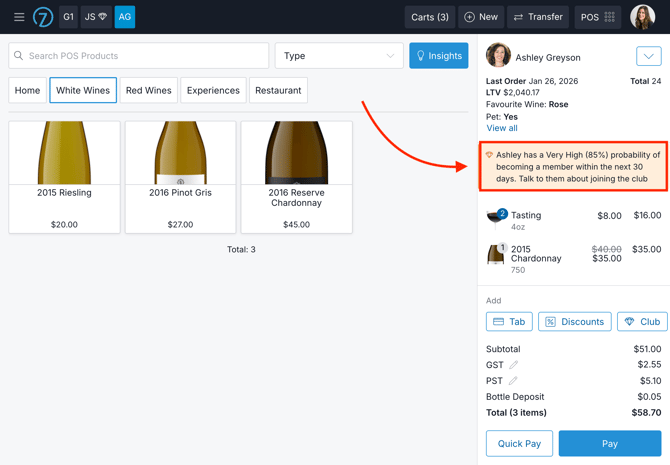
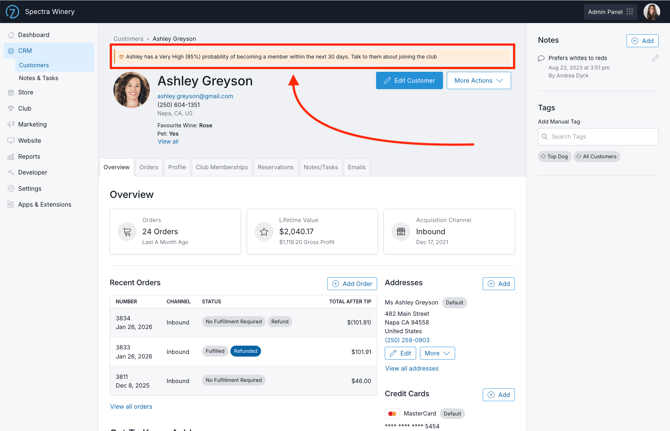
In the tasting room:- If a customer’s Club Signup Prediction is High or Very High, a flag appears on their customer record, in all Insights panels, and in the POS Cart to prompt staff to start a club conversation.
Build marketing campaigns to target the right people:
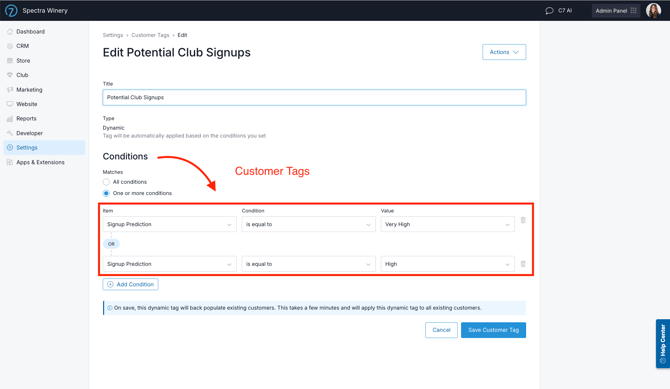
- Go to Settings > Tags > Add Customer Tag and select a type of Dynamic
- Under Conditions, select Signup Prediction, is equal to, 'High' or 'Very High'
- Now that you have your list, go to Marketing > Campaigns
- Click Add Campaign, and select the template for Wine Club Signup
- Customize the content to properly introduce customers to your club and the benefits they’d receive.
Reporting & Exports
Signup Prediction data is available in the following reporting:
-
- WinePulse customer reports
- Customer export under CRM > Customers > Actions > Export Customers
- Queries (condition of 'Signup Prediction')
- Dynamic Tags (condition of 'Signup Prediction')
Does the Club Signup Prediction automatically exclude former wine club members?
No. Former members are included in the Club Signup Prediction, as they may be interested in rejoining.