
Gift cards can be imported or updated in bulk through a CSV file. Update core details such as Title, Expiry Date, and Notes, and add funds to the existing balance.
In this Article
Using the Importer Tool
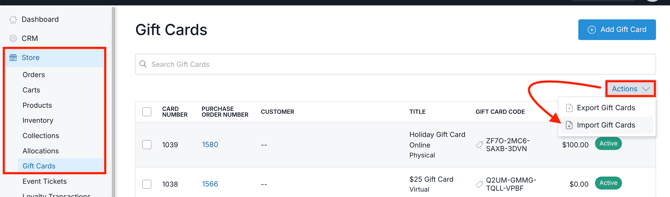
- From the Dashboard, go to Store
- Choose Gift Cards
- Click the Actions button
- Choose Import Gift Cards
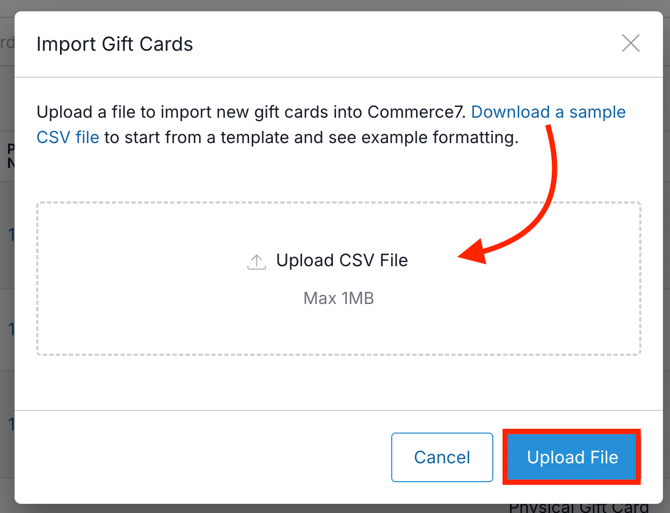
- Download the CSV template and fill it out.
- Add the file to the uploader section and click the Upload File button.
Filling Out the CSV Template
Required fields and formatting considerations:
| Column | Required? | Formatting Considerations |
| Title | No | Creates with entered title, if a Title isn’t entered, create a gift card with 'Gift Card'. |
| Type | Yes | Options: Physical, Virtual |
| Status | Yes | Options: Active, Cancelled |
| Code | No |
|
| Amount | Yes |
|
| Expiry Date | No | Format: YYYY-MM-DD |
| Notes | No | -- |
| No | In the Email column, enter an email address; if it matches an existing customer record, the gift card will be attached to their record, if it doesn't find a match, a new customer record will be created. |
If updating a gift card with the importer, blank columns in the import file will not delete that data.
-
For example, if you enter in an existing Code to update an existing Gift Card, and then leave the Notes column blank, any existing Notes will be retained.