
Analyze everything from sales to cancellations to tenure in your clubs.
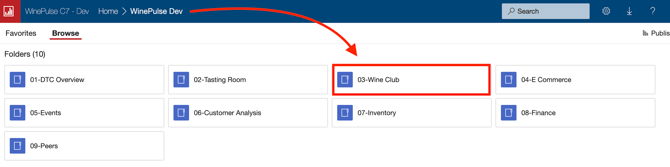
- Choose the 03- Wine Club folder.
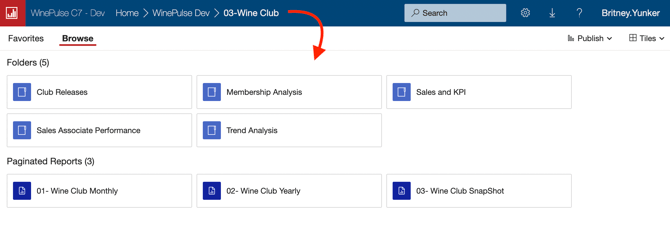
- Depending on what you need, choose the applicable report.
Common queries and how to find the answers
- How can I analyze club cancellations and average tenure?
Learn how here. - How can I report on new, cancelled and on-hold members by month?
Learn how here. - How many club orders did I successfully process last month for each of our clubs?
Learn how here. - How can I analyze sales performance based on various clubs based on product?
Learn how here. - How can I report on wine club tenure based on sales associate?
Learn how here. - How can I do a comprehensive wine club membership analysis?
Learn how here. - Is it possible to identify club members and customers based on their geographic location?
Learn how here. -
Why are my old Wine club names not displaying in some reports?
If you rename a Wine Club to a new name (rather than creating a new club name from scratch), the old club names may not display. However, be assured that the Wine Club sales for the old club names will be included/amalgamated into the current (new) club name.
-
Does the 'WC Active Members' metric count individual members or memberships?
Memberships. - How/when is Reservations revenue calculated in WinePulse vs Commerce7?
- Reservations are calculated in C7 based on when the reservation was paid for.
- Reservations are calculated in WinePulse based on the actual date of the scheduled reservation.
- Therefore: If I pay for a reservation today (the 1st) for a date 2 weeks from now (the 14th), then C7 will reflect that revenue on the 1st and WinePulse will reflect that revenue on the 14th.
- What sales channel are reservations attributed to in WinePulse?
Tasting Room (POS) channel - and this is even if the reservation was paid for on the web. - How are Signups calculated in WinePulse vs Commerce7?
- Signups in Commerce7 are calculated at the membership level (if a person is a member of one club and then joins an additional club, that is counted as TWO signups).
- Signups in WinePulse are calculated at the individual member level (if a person is a member of one club and then joins an additional club, that is counted as ONE signup).
- Can cancellations be tracked by sales associate?
Yes. Go to 04-Wine Club → Sales Associate Performance → Report #02 – WC Members Tenure by Sales Associate. - When a member switches clubs, is it counted as a cancel and a new signup?
Yes, if a member switches clubs, it's counted as a cancellation and a new signup. - Can WinePulse distinguish true new signups vs switches?
Yes. To see the distinction, go to 03-Wine Club > Membership Analysis > 01-Membership Overview. -
Do club transactions in POS count as tasting room sales?
Yes. POS channel transactions appear in tasting room sales metrics. - What does 'Other Added' mean in the club membership reports?
If someone SWITCHES clubs in C7 - that is NOT considered a new membership - and you will see it reflected in the 'other added' box instead (and the old membership will be included in the 'Cancelled' box). Also included in the 'other added' box are those existing club members who join an additional club.