
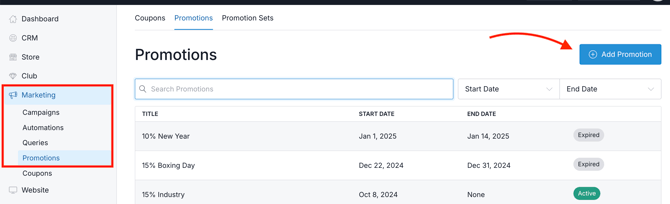
- Go to Marketing > Promotions (or Coupons).
- Click the Add Promotion button.
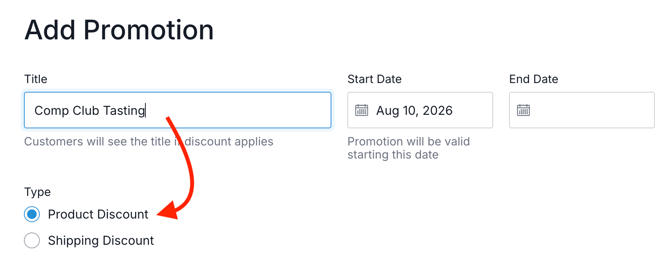
- Name it and select Product Discount.
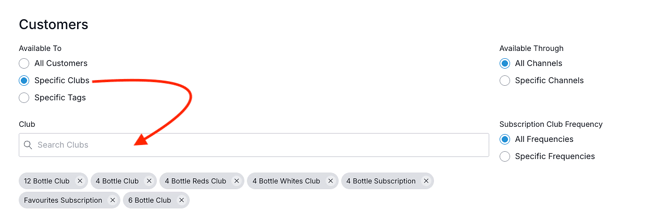
- Customers: Select which club(s) should receive this discount.
- In the Available To section, select Specific Clubs.
- Search to select the club(s) that should receive it.
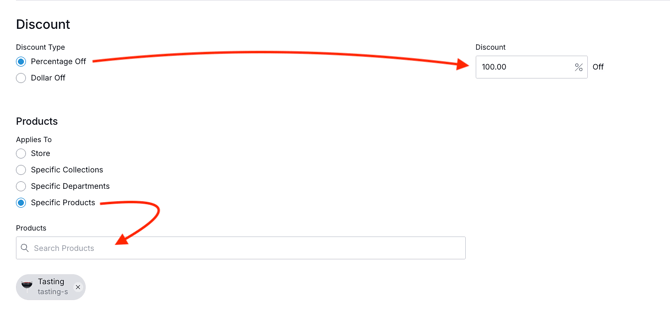
- Discount: Set up the discount amount and which products it should apply to.
- Enter in the discount that members should receive for tastings. (This is typically 100% off).
- In the Products > Applies To section, select Specific Products.
- !! Important !! This step prevents the 100% discount from applying to your entire store or to unintended products.
- Specify which tasting SKUs members should receive at 100% off.
- If you use Reservations for your tasting - and you want to offer members a discount, select those reservation products here as well.
- !! Important !! This step prevents the 100% discount from applying to your entire store or to unintended products.
- In the Limit Usage section, enter the number of tastings each member should receive for free or at a discount.
- Click on 'Orders' and change it to 'Items'. This determines how many tasting products each member can receive at the discounted price.
- Select a time period. Choose the appropriate reset period from the dropdown: select 'Per Month' if member benefits reset monthly or 'Per Year' if they reset annually.
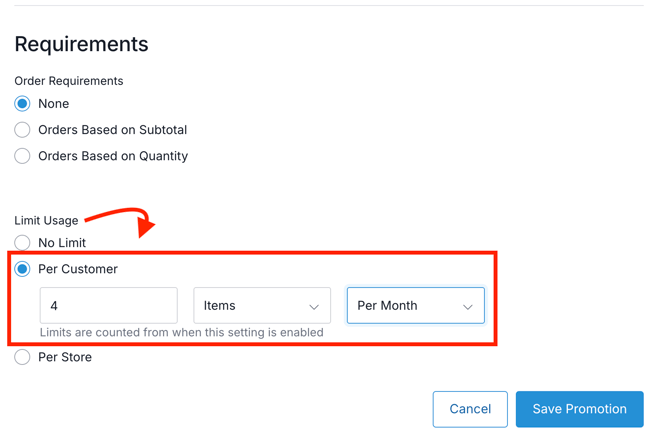
- When satisfied, click the Save Promotion button.
- Requirements: Set up restrictions for how often the discount can be used.
Note: At this time, there is no way to look up a member’s usage history to see how many discounts they have used - or how many remain.