
Identify Club Members who seldom or never place online orders so you can target them with marketing efforts.
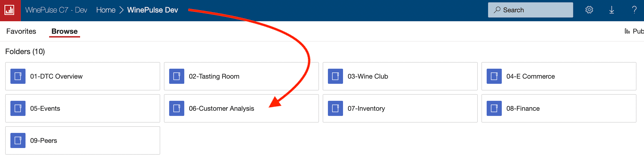
- Choose 06- Customer Analysis
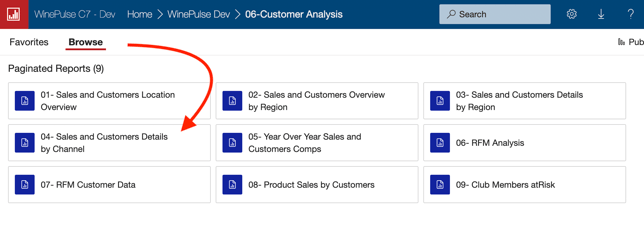
- Choose 04- Sales and Customers Detail by Channel
- Choose a date range.
- Choose 'All' from the X-Customers dropdown.
- Click the View Report button.

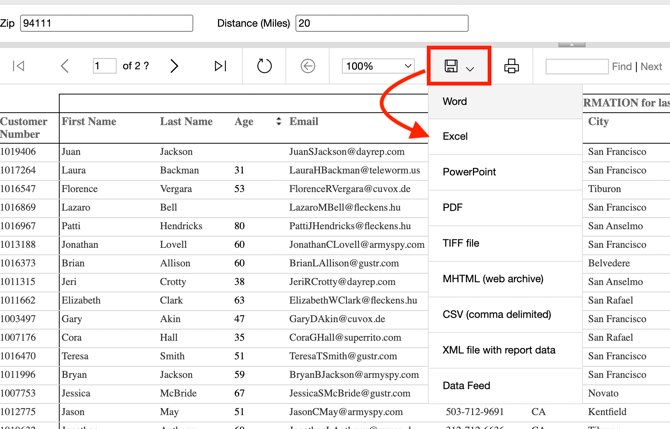
- Download the results into Excel.
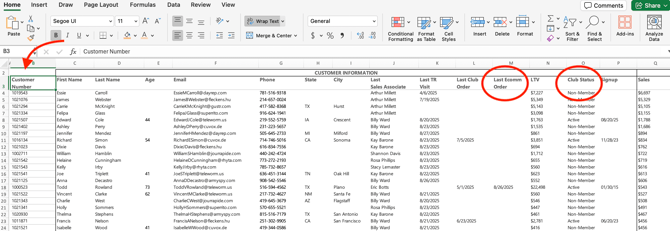
- Open the Excel spreadsheet.
- Club Status Column: Sort for 'Active'.
- Delete any Members who are not Active.
- Last EComm Order Column: Sort so that the dates are in chronological order. (note this date is based on online wine purchases and does not include event tickets).
- Review the list and choose your target Members.
- Delete any Members who are not in your target list.
- Customer Number Column: Sort by Customer Number.
Excluding Local Members from your Results
If you would like to exclude your locals from your marketing campaign, here's how to produce a list of your local customers.
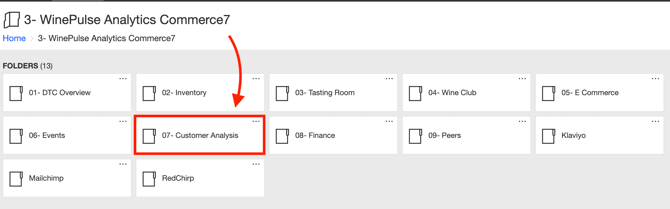
- Choose 07- Customer Analysis
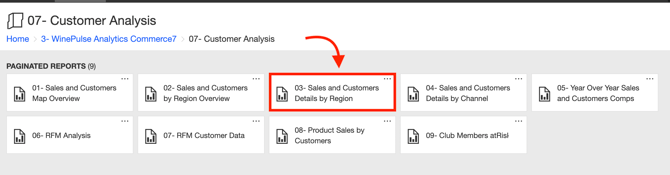
- Choose 03- Sales and Customers Details by Region
- Enter your Zip Code and mileage radius to capture your locals.
- Click the View Report button.

- Download the results into Excel.
- Open the Excel spreadsheet.
- Club Status Column: Sort for 'Active'.
- Delete any Members who are not Active.
- Customer Number Column: Sort by Customer Number.
- Remove the Customer Numbers in this local members spreadsheet from your original target report. You can do this one of two ways depending on your Excel expertise.
- Option 1: You can filter out local members by using Excel’s vlookup or match functions.
- Option 2: Alternatively, copy the customer numbers from both reports into a single column in a new spreadsheet, sort the numbers, and use conditional formatting to highlight any duplicates.
- Delete the highlighted rows to remove these members from your target list.